Samsung no longer includes printed manuals in the box, but that doesn’t mean you’re left guessing how to use your $1,200+ flagship. Whether you’ve just unboxed your Galaxy S26 Ultra or need offline access to troubleshooting steps, downloading the official PDF manual is essential. This guide covers every legitimate method to get your hands on the Samsung Galaxy S26 Ultra manual PDF—directly from Samsung, through your device, and via trusted resources.
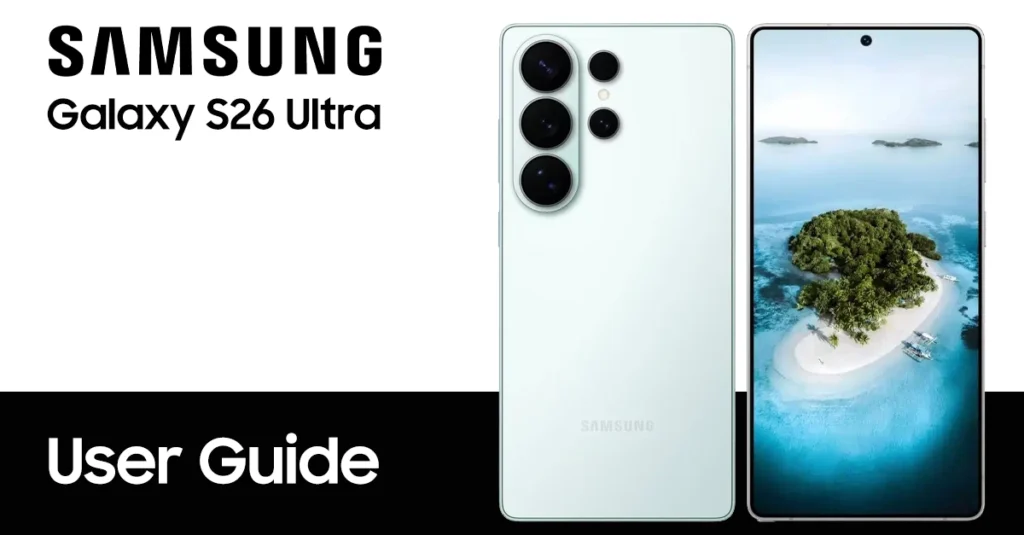
Why Download the Galaxy S26 Ultra User Guide?
The Samsung Galaxy S26 Ultra manual isn’t just a booklet—it’s a comprehensive 160+ page document covering everything from eSIM setup to Galaxy AI features. Having it as a PDF means:
- Offline access during travel or in areas with poor connectivity.
- Searchable text to instantly find specific settings or error codes.
- Battery and safety information verified by Samsung engineers (critical for warranty compliance).
- S Pen tutorials and Samsung DeX setup instructions you won’t find in quick-start cards.
The official manual covers One UI 8.5 (based on Android 16), including new AI features like Now Brief, Audio Eraser for video editing, and Creative Studio generative tools.
Where to Get the Official Galaxy S26 Ultra Manual PDF
To download the Samsung S26 Ultra manual, you can find on the table listed below. Please select based on model number, country or your language.
Note: This user guide is taken from Samsung’s official website; we have simply compiled to make it easier to download in your preferred language.
| Country | Version | Model Numbers | Language | Download |
|---|---|---|---|---|
| Global - Unlocked | Galaxy S26 Ultra | SM-S948B/DS | English | Download |
| Albania | Galaxy S26 Ultra | SM-S948B/DS | Albanian | Download |
| Australia | Galaxy S26 Ultra | SM-S948B/DS | English | Download |
| Brazil | Galaxy S26 Ultra | SM-S948B/DS | Português | Download |
| Bulgaria | Galaxy S26 Ultra | SM-S948B/DS | Български | Download |
| Canada | Galaxy S26 Ultra | SM-S9348W | English | Download |
| Canada | Galaxy S26 Ultra | SM-S948W | Français | Download |
| China | Galaxy S26 Ultra | SM-S9480 | 中文 | Download |
| Croatia | Galaxy S26 Ultra | SM-S948B/DS | Hrvatski | Download |
| Česká republika | Galaxy S26 Ultra | SM-S948B/DS | Čeština | Download |
| Danmark | Galaxy S26 Ultra | SM-S948B/DS | Dansk | Download |
| Estonian | Galaxy S26 Ultra | SM-S948B/DS | Eesti | Download |
| Europe | Galaxy S26 Ultra | SM-S948B/DS | English | Download |
| Finland | Galaxy S26 Ultra | SM-S948B/DS | Finnish | Download |
| France | Galaxy S26 Ultra | SM-S948B/DS | Français | Download |
| German | Galaxy S26 Ultra | SM-S948B/DS | Germany | Download |
| Greece | Galaxy S26 Ultra | SM-S948B/DS | Greek | Download |
| Hongkong | Galaxy S26 Ultra | SM-S948B/DS | Traditional Chinese | Download |
| Hungary | Galaxy S26 Ultra | SM-S948B/DS | Magyar/Hungarian | Download |
| India | Galaxy S26 Ultra | SM-S948B/DS | Bengali | Download |
| Indonesia | Galaxy S26 Ultra | SM-S948B/DS | Bahasa Indonesia | Download |
| Israel | Galaxy S26 Ultra | SM-S948B/DS | Hebrew | TBA |
| Italia | Galaxy S26 Ultra | SM-S948B/DS | Italiano | Download |
| Korea | Galaxy S26 Ultra | SM-S948N | 한국어 | Download |
| Laos | Galaxy S26 Ultra | SM-S948B/DS | ພາສາລາວ | Download |
| Latin America | Galaxy S26 Ultra | SM-S948B/DS | Spanish/Español | Download |
| Latvia | Galaxy S26 Ultra | SM-S948B/DS | Latviešu | Download |
| Lithuania | Galaxy S26 Ultra | SM-S948B/DS | Lietuvių | Download |
| Macedonia | Galaxy S26 Ultra | SM-S948B/DS | Mакедонски | Download |
| Middle East | Galaxy S26 Ultra | SM-S948B/DS | Arabic | Download |
| Nederlands | Galaxy S26 Ultra | SM-S948B/DS | Nederlands | Download |
| Myanmar | Galaxy S26 Ultra | SM-S948B/DS | Burmese | Download |
| New Zealand | Galaxy S26 Ultra | SM-S948B/DS | English | Download |
| Norwegia | Galaxy S26 Ultra | SM-S948B/DS | Norsk | Download |
| Pakistan | Galaxy S26 Ultra | SM-S948B/DS | Urdu | TBA |
| Poland | Galaxy S26 Ultra | SM-S948B/DS | Język polski | Download |
| Portugal | Galaxy S26 Ultra | SM-S948B/DS | Português | Download |
| Romania | Galaxy S26 Ultra | SM-S948B/DS | Română | Download |
| Russia | Galaxy S26 Ultra | SM-S948B/DS | Русский | Download |
| Serbia | Galaxy S26 Ultra | SM-S948B/DS | Serbian | Download |
| Singapore | Galaxy S26 Ultra | SM-S948B/DS | English | Download |
| Singapore | Galaxy S26 Ultra | SM-S948B/DS | Simplified Chinese | Download |
| Slovakia | Galaxy S26 Ultra | SM-S948B/DS | Slovak | Download |
| Slovenija | Galaxy S26 Ultra | SM-S948B/DS | Slovene | Download |
| South East Asia | Galaxy S26 Ultra | SM-S948B/DS | English | Download |
| South East Asia | Galaxy S26 Ultra | SM-S948B/DS | Simplified Chinese | Download |
| Spain | Galaxy S26 Ultra | SM-S948B/DS | Español | Download |
| Sweden | Galaxy S26 Ultra | SM-S948B/DS | Svenska | Download |
| Taiwan | Galaxy S26 Ultra | SM-S948B/DS | Traditional Chinese | Download |
| Thailand | Galaxy S26 Ultra | SM-S948B/DS | Thai | Download |
| Turkey | Galaxy S26 Ultra | SM-S948B/DS | Turkish | Download |
| Ukraina | Galaxy S26 Ultra | SM-S948B/DS | Ukrainian | Download |
| United Kingdom | Galaxy S26 Ultra | SM-S948B/DS | English | Download |
| US – AT&T | Galaxy S26 Ultra | SM-S948U | English | Download |
| US – Metro PCS | Galaxy S26 Ultra | SM-S948U | English | Download |
| US – Cricket | Galaxy S26 Ultra | SM-S948U | English | Download |
| US – Cricket | Galaxy S26 Ultra | SM-S948U | Spanish/Español | Download |
| US – US Cellular | Galaxy S26 Ultra | SM-S948U | English | Download |
| US – T-Mobile | Galaxy S26 Ultra | SM-S948U | English | Download |
| US – Verizon | Galaxy S26 Ultra | SM-S948U | English | Download |
| Vietnam | Galaxy S26 Ultra | SM-S948B/DS | Tiếng Việt Nam | Download |
NOTE: For reading this manual, your computer required Adobe Reader apps. You can get the Adobe Reader for free by going here https://get.adobe.com/reader/.
Download the manual via Samsung Official support page
The safest way to download your Galaxy S26 Ultra user guide is directly from Samsung’s official support website or trusted platforms that offer verified content.
Samsung provides specialized manuals for different regions and languages, ensuring you get the right version for your device model.
- Visit Samsung’s official support page.
- Search for “Galaxy S26 Ultra manual” or enter your model number.
- Download the PDF user guide to your smartphone, tablet, or computer.
You can also check the pre-installed Samsung Members app on your device under the “Support” section to download the manual directly.
Why Official Manuals Matter for S26 Ultra Owners
The temptation to rely on quick web searches or unofficial guides undermines your ownership experience. Official documentation provides irreplaceable advantages third-party sources cannot match.
Accuracy and Safety
Samsung engineers write and verify every procedure in official manuals. Incorrect third-party instructions risk device damage, voided warranties, or security vulnerabilities. Battery handling, water exposure, and charging procedures particularly require manufacturer-approved guidance.
Comprehensive Coverage
Unofficial guides typically address popular features while ignoring niche capabilities. The official Samsung S26 Ultra manual PDF documents every setting, permission, and hardware component. This completeness proves essential when troubleshooting rare issues or exploring advanced functionality.
What’s Inside the Samsung S26 Ultra User Guide?
The manual covers all key aspects of the device, including:
- Detailed device overview including buttons, ports, and features.
- Step-by-step setup instructions from powering on, setting up the voicemail feature, setting up Wi-Fi calling, to network configuration.
- Advanced functionality like camera use, multi-window mode, taking a screenshot, and AI features.
- Customization tips for display, notifications, sounds, usb configurations, and shortcuts.
- Troubleshooting advice for common problems such as warning camera failed, connectivity issues, device keeps restart, or app crashes.
What the Galaxy S26 Ultra User Guide Covers?
The official 160+ page PDF is organized into logical sections for both beginners and power users:
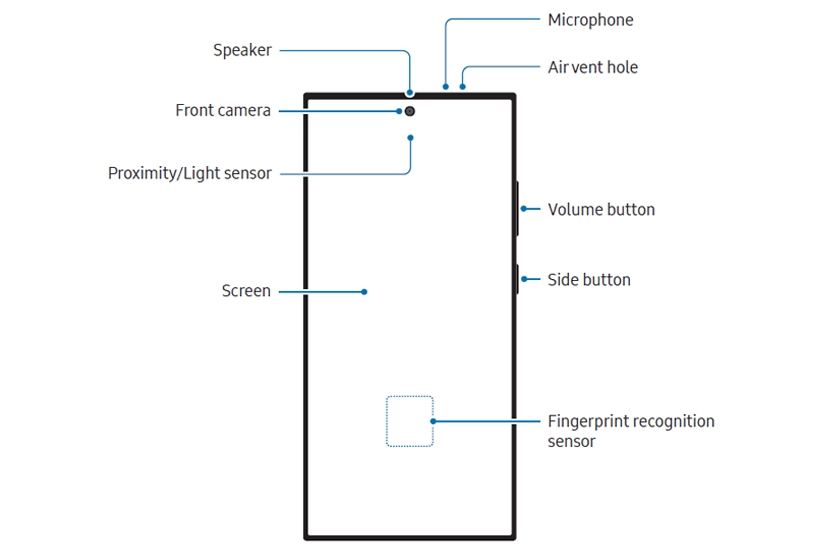
Getting Started
- Device layout and button functions.
- Nano-SIM and eSIM installation (dual SIM tray diagrams).
- Charging procedures and battery safety.
- Initial setup wizard and Samsung account creation.
- Smart Switch data transfer from old devices.
Galaxy AI & Advanced Features
- Now Brief: AI-generated daily briefings based on your interests.
- Now Nudge: Contextual suggestions based on screen content.
- Notification Highlights: Priority notification summaries.
- Photo Assist: Generative editing, object removal, and style transfer.
- Audio Eraser: Remove wind, voices, or background noise from videos.
- Creative Studio: Generate artwork from text prompts or drawings.
S Pen (Galaxy S26 Ultra Exclusive)
- Detaching and storing the S Pen.
- Air Command gestures and screen-off memos.
- Handwriting-to-text conversion.
- PENUP social network integration.
Camera Mastery
- 200MP mode and AI-enhanced zoom.
- Nightography and Astro Hyperlapse.
- 8K video recording and Director’s View.
- Super Steady stabilization and Instant Slow-mo.
Productivity
- Samsung DeX desktop mode setup.
- Multi-window multitasking and App Pairs.
- Link to Windows integration.
- Secure Folder and Knox security features.
Settings & Troubleshooting
- Wi-Fi 7 and Bluetooth 5.4 configuration
- Battery protection and adaptive power saving
- Factory reset procedures with data backup prerequisites
- Common fixes for “Warning: Camera Failed,” connectivity issues, and app crashes
Important Safety & Warranty Notes
Samsung explicitly warns against using third-party or unofficial manuals. Here’s why the official PDF matters:
- Accuracy: Samsung engineers write and verify every procedure. Incorrect third-party instructions risk device damage or voided warranties.
- Battery Safety: The manual contains critical charging guidelines for the S26 Ultra’s optimized battery health. Using unapproved methods may damage the battery or reduce lifespan.
- Water Resistance: IP68 certification details and maintenance procedures are only accurate in the official documentation.
- Regulatory Compliance: Regional manuals include specific legal and safety certifications required for your country.
*The included USB cable supports up to 3A charging. For optimal charging performance, Samsung recommends using an official 60W charger and compatible cable, sold separately.*
FAQ: Samsung Galaxy S26 Ultra Manual PDF
Is the Samsung Galaxy S26 Ultra manual free?
Yes. Samsung provides the official user manual as a free download from their support website. Never pay for a manual—if a site asks for payment, it’s unofficial.
What model number do I need?
Check Settings > About Phone > Model Number. Common variants:
- SM-S948B/DS: Global unlocked (dual SIM).
- SM-S948U: US carrier models.
- SM-S948W: Canada.
- SM-S948N: Korea.
- SM-S9480: China/Hong Kong.
Can I read the manual without Adobe Reader?
Yes. While Samsung mentions Adobe Reader, any modern PDF viewer, browser, or phone file manager can open the manual. Google Drive, Apple Books, and Samsung’s own My Files app work perfectly.
Is there a printed version available?
Samsung no longer includes printed manuals in the box for environmental reasons. However, you can print the PDF yourself if you prefer a physical copy.
What if my language isn’t listed?
Samsung provides manuals in 30+ languages. If your language is missing from the regional page, check the global unlocked (SM-S948B/DS) version, which typically includes the most language options.
Pro Tips for Using Your S26 Ultra Manual
- Save Locally: Download the PDF to your phone’s storage and bookmark key sections (Camera, Troubleshooting, S Pen) for instant access.
- Search Smart: Use Ctrl+F (or your PDF app’s search) for specific error messages or feature names like “Wi-Fi calling” or “Secure Folder.”
- Check for Updates: Samsung occasionally releases manual updates after major software updates. Revisit the support page quarterly.
- Backup Before Resets: The troubleshooting section includes factory reset steps—always back up via Samsung Cloud or Smart Switch first, as noted in the manual.
Conclusion
Getting your Samsung Galaxy S26 Ultra manual PDF takes less than two minutes when you use official Samsung channels. Whether you download from Samsung’s support site, access it through your phone’s Settings, or grab it via the Samsung Members app, you’ll have authoritative, searchable documentation for every feature—from basic setup to professional-grade S Pen workflows.
Don’t settle for unofficial guides. The official manual ensures accuracy, protects your warranty, and helps you unlock the full potential of your Galaxy S26 Ultra’s AI-powered camera system, desktop-grade DeX mode, and advanced productivity tools.
Download your official Samsung Galaxy S26 Ultra manual PDF today and master every feature of your flagship device.
dnke, deine Arbeit ist wirklich perfekt
Where can I find a user guide for my S26 Ultra? I buy it from xfinity.
Hi, here you go user guide for Xfinity
Why is there no listing for S26Ultra from Comcast?
Hi, you can get here for Comcast